Common on-page SEO mistakes to avoid can be the difference between ranking on page one and getting buried in search results. On-page Search Engine Optimization (SEO) refers to all the measures you can take directly within your website to improve its position in the search rankings. Many websites lose potential customers daily by making simple yet critical errors in their on-page strategy. These issues range from deep technical glitches like slow page speed and broken links to fundamental content problems like targeting the wrong keywords or publishing thin, unhelpful material.
When you get on-page SEO right, you create a seamless, valuable experience for both users and search engines. It's about signaling to Google that your page is the best, most relevant answer to a user's query. According to research, 67% of all clicks go to the top five organic results. This statistic highlights why avoiding these pitfalls isn't just helpful—it's essential for online visibility and survival in a crowded digital marketplace.
These mistakes don't just hurt your rankings; they actively damage user experience, which leads to higher bounce rates, lower engagement, and a tarnished brand reputation. They waste your marketing budget and hand customers directly to your competitors on a silver platter. The good news is that most of these errors are entirely within your control and are easy to fix once you know what to look for. This comprehensive guide will walk you through the most critical errors and provide actionable steps on how to correct them, helping you build a website that search engines and, most importantly, users will love.
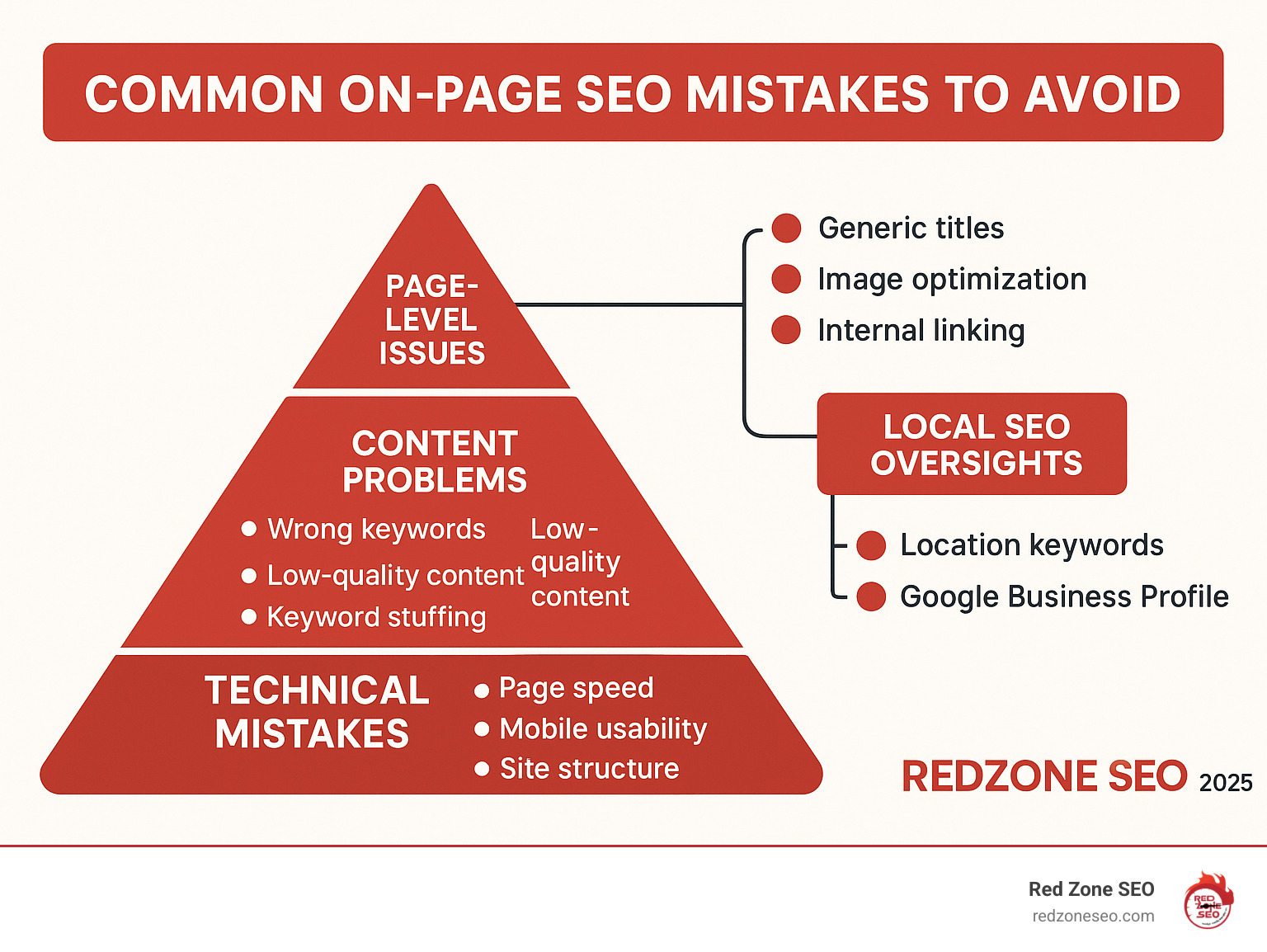
Quick common on-page seo mistakes to avoid definitions:
Think of technical SEO as your website's foundation. If it's cracked, everything you build on top becomes unstable and at risk of collapse. These common on-page SEO mistakes to avoid at a technical level can sabotage your rankings, no matter how great your content is. When search engines can't properly crawl, index, or understand your site, you're essentially invisible. Let's explore the most damaging technical errors.
Slow websites frustrate users and kill conversions. After about three seconds of waiting, a significant portion of visitors will leave. This is why page speed is a confirmed Google ranking factor, especially with the Page Experience update. A high bounce rate is a strong signal to Google that your site offers a poor user experience, which can demote your rankings.
Google's Core Web Vitals are specific metrics that measure this experience, focusing on:
To fix slow speeds, start with image compression and modern formats like WebP, as large photos are a common culprit. Also, minify CSS and JavaScript to remove unnecessary code, enable browser caching so returning visitors load pages faster, and consider using a Content Delivery Network (CDN) to serve assets from servers closer to your users. Use Google PageSpeed Insights to get specific recommendations. For a deeper dive, our guide on How to Conduct a Technical SEO Audit is a valuable resource.
Since 2019, Google has primarily used your mobile site for indexing and ranking (this is called mobile-first indexing). A poor mobile experience will directly hurt your desktop rankings, too. With mobile searches for "near me" growing 900 percent between 2013 and 2017, you can't afford to ignore this massive source of traffic. In fact, 76 percent of people who search for something nearby on mobile visit the business within a day.
Responsive design is non-negotiable. Your site must automatically adapt to any screen size, from a small smartphone to a large desktop monitor. This means having readable text without zooming, tap targets large enough for human fingers, and avoiding intrusive pop-ups that cover the main content on mobile devices. Use Google's mobile-friendly test to see what needs fixing. This is a cornerstone of our SEO for Small Business strategy.
Poor site structure confuses both users and search engines, hurting crawlability and indexability. A logical structure helps search engine bots understand the relationship between your pages and which ones are most important. Your URL structure should be a clear reflection of this hierarchy. As Moz notes, a well-crafted URL is beneficial to readers and search engines.
SEO-friendly URLs are concise, use hyphens instead of underscores to separate words, and include relevant keywords that describe the page's content. For example, yourdomain.com/services/local-seo is far better than yourdomain.com/page_id=123. Ensure your site uses HTTPS for security and trust; it's a minor ranking signal and essential for user confidence. A logical site hierarchy with clear categories and subcategories (often called a "silo" structure) is also crucial for distributing authority throughout your site. For e-commerce sites, our guide on E-commerce Site Structure SEO Contextual Links provides specialized advice.
Clicking a link only to land on a "404 Page Not Found" error is a frustrating experience that kills user trust. Broken links create dead ends that stop visitors and search engine crawlers in their tracks. This wastes your crawl budget—the number of pages Google will crawl on your site in a given period. These 404 errors also dilute your link equity, the value passed through your internal and external links.
Faulty redirects, like redirect chains (Page A -> Page B -> Page C) or loops (Page A -> Page B -> Page A), slow down your site and can prevent search engines from accessing your content entirely. Use tools like Google Search Console or Screaming Frog to find and fix these issues. When you find a broken internal link, either recreate the page, implement a permanent 301 redirect to the most relevant live page, or remove the link. Regular maintenance as part of a comprehensive SEO Audit prevents these problems from damaging your rankings.
Content is the heart of your SEO strategy, but creating content without a clear purpose or audience in mind is a recipe for failure. These common on-page SEO mistakes to avoid relate to what you write and the keywords you target, directly impacting your ability to attract, engage, and convert the right audience.
Many businesses make the critical mistake of skipping keyword research or chasing highly competitive, generic "vanity" terms. For example, a local Denver bakery trying to rank for "cake" is competing against massive international brands and recipe sites. This is a battle they can't win.
Generic keywords also suffer from unclear search intent. Someone searching "cake" could want a recipe, pictures, or decorating tips. In contrast, someone searching "custom birthday cake Denver" is a high-intent potential customer ready to buy. This is why many times, lower-traffic phrases will convert better—they are more specific and align with user needs. Understanding the four main types of search intent is key:
Focus on long-tail keywords (phrases of 3+ words) that match the specific intent of your ideal customers. Fifty visitors from "gluten-free wedding cakes Denver" are far more valuable than thousands from "cake." Start with thorough Keyword Research to find terms that balance search volume with realistic ranking opportunity.
Thin content offers little to no value to the reader, like a "gardening guide" with only three generic paragraphs. Quality content, on the other hand, demonstrates E-E-A-T (Experience, Expertise, Authoritativeness, and Trustworthiness) and is genuinely useful. While there's no magic word count, every important page should have at least 300 words of unique, valuable text. For competitive topics, 1,000-2,000+ words are often needed to be comprehensive.
Duplicate content confuses search engines when multiple pages on your site have identical or nearly identical text, diluting your ranking potential. This often happens when e-commerce sites use generic manufacturer descriptions or when service businesses use the same boilerplate text for different location pages. To fix this, use canonical tags to tell Google which page is the master version. Better yet, consolidate similar pages into one strong resource or rewrite the content to be unique and valuable for each page. Always rewrite manufacturer descriptions. Use a tool like Copyscape to find issues and our Content Optimization services to fix them.
Keyword stuffing is the outdated and unnatural practice of cramming keywords into your content to manipulate rankings. It's a black-hat tactic that modern search engines easily detect and penalize. More importantly, it creates a terrible, often unreadable user experience, leading to high bounce rates that further harm your rankings.
Google's algorithms, powered by AI like BERT and MUM, now understand natural language, context, and semantics. Instead of obsessing over keyword density, focus on covering your topic comprehensively with related terms, synonyms, and answers to common questions. This demonstrates topical authority. Write for humans first. If your content is valuable, well-structured, and reads naturally, you're on the right track.
Google's official policy on keyword stuffing is clear: it violates their guidelines and can lead to a ranking penalty. We follow ethical SEO Content Strategies to create effective, penalty-free content that users and search engines value.
With a solid technical and content foundation, it's time to zoom in and focus on individual page elements. These common on-page SEO mistakes to avoid are often simple fixes that can significantly boost click-through rates, user engagement, and rankings. Getting these details right is what separates good SEO from great SEO.
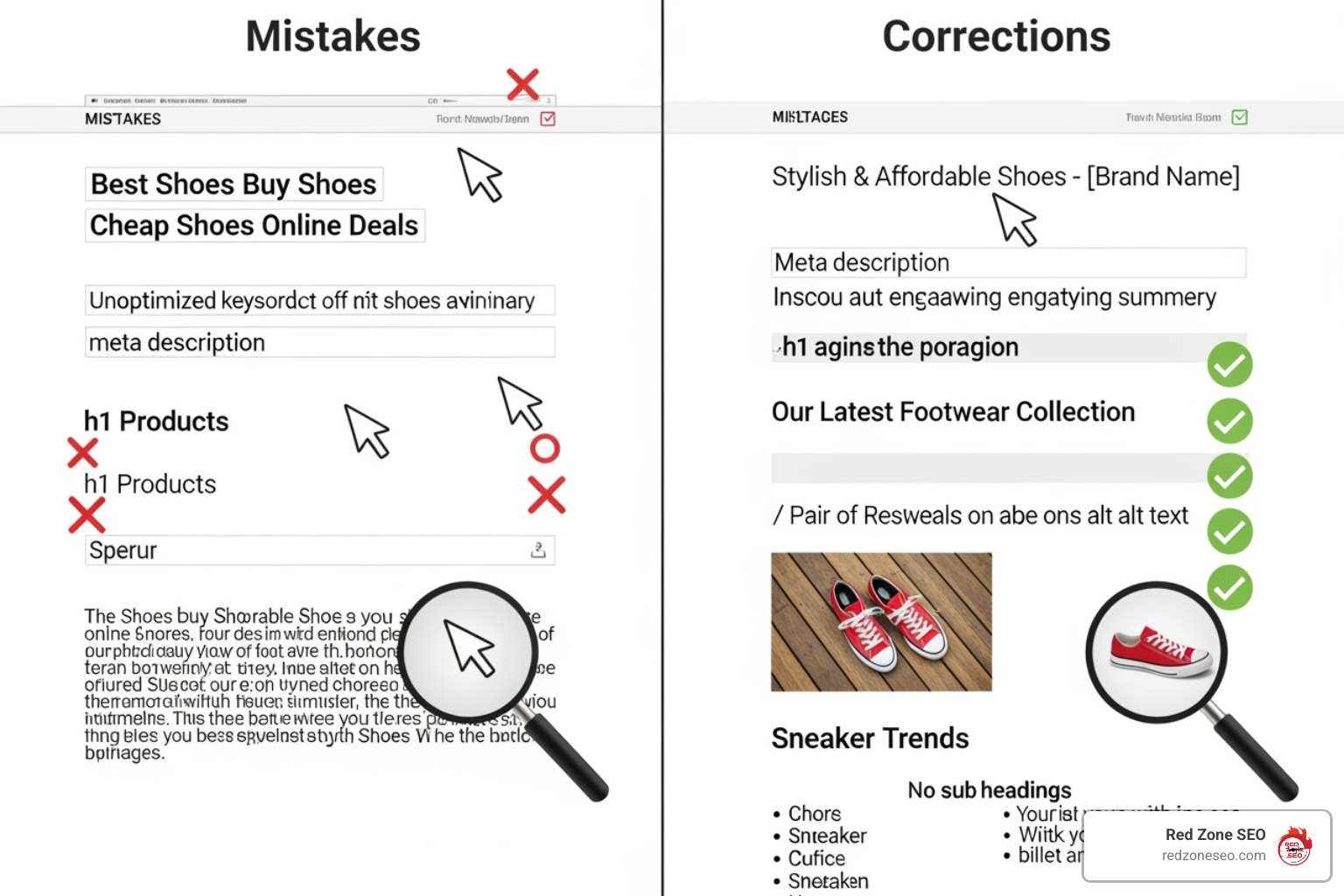
Your title tag and meta description are your digital billboard in the search results. The title tag is the clickable headline and a direct, heavyweight ranking factor. The meta description is the short sales pitch underneath that convinces users to click on your result over a competitor's.
Many businesses use generic or duplicate titles like "Home" or "Product Page," which tells users and search engines nothing. This hurts your click-through rate (CTR) and can cause keyword cannibalization, where your own pages compete against each other. A low CTR signals to Google that your result isn't relevant to the query, which can lower your rankings over time.
The fix: Every page needs a unique, compelling title and meta description. Keep title tags between 50-60 characters and meta descriptions between 50-160 characters to avoid truncation. Include your primary keyword naturally, preferably near the beginning of the title, and write ad-like copy that highlights value and encourages clicks. For example, instead of "Services," use "Las Vegas SEO Services That Increase Your Rankings." As Moz explains, the optimal format for writing the meta title is key. This is a fundamental part of the On-Page SEO Definition.
A common and often overlooked mistake is the improper use of header tags. These tags (H1, H2, H3, etc.) are not just for styling text; they create a logical, hierarchical structure for your content. The H1 is the main title of the page's content, H2s are main subheadings, H3s are sub-points of H2s, and so on. This structure helps search engines understand the main topics of your page and makes the content more scannable for readers.
The fix: Use only one H1 tag per page, and it should closely align with the page's title tag and primary keyword. Use H2s and H3s to break up your content into logical sections, incorporating related keywords where they fit naturally. Never skip heading levels (e.g., going from an H2 to an H4) and don't use them simply to make text bigger or bold.
Images improve engagement but can kill rankings if not optimized. Large, uncompressed images are a primary cause of slow page speed, which directly impacts your Google ranking.
Another critical element is alt text (alternative text). This descriptive text serves two main purposes: it helps visually impaired users with screen readers understand your images, making your site more accessible, and it gives search engines context, as they cannot "see" images. Missing alt text hurts both accessibility and your ability to rank in image searches.

The solution: Compress images using tools like PicResize or plugins to reduce file size without sacrificing too much quality. Choose the right file format: JPEG for photos, PNG for graphics needing transparency, and WebP for the best combination of quality and compression. Use descriptive filenames (e.g., red-mountain-bike.jpg instead of IMG_001.jpg). Write meaningful, descriptive alt text that describes the image and includes keywords naturally where appropriate. This is a key step in How to Check On-Page SEO.
Internal linking is one of the most powerful and underused SEO tools. It guides users and search engines through your site, distributes "link equity" (authority) between pages, and helps establish topical relevance, which can boost rankings. Good internal linking also keeps visitors engaged longer, reducing bounce rates.
Most websites go wrong by using generic anchor text like "click here" or "read more." This provides zero context to users or search engines. Another mistake is having orphaned pages with no internal links pointing to them, making them nearly impossible for search engines to find and index.
The fix: Use descriptive, keyword-rich anchor text contextually within your content. For example, link to your service page with "our comprehensive Las Vegas SEO services" instead of "click here." Create a logical linking structure, such as topic clusters where you link from a main "pillar" page to related, in-depth "cluster" pages and back. Don't overdo it; focus on quality, relevant links that add value for the reader. Our On-Page SEO Checklist provides detailed strategies for building an effective internal linking structure.
For businesses serving specific geographic areas—from plumbers and restaurants to lawyers and dentists—ignoring local SEO is one of the biggest common on-page SEO mistakes to avoid. A huge percentage of searches have local intent, representing customers in your area who are ready to buy now. When you search for a service, you likely use terms like "plumber near me" or "best pizza in [your city]." If your business isn't optimized for these high-value searches, you're invisible to your most qualified customers.
A local business optimizing for generic terms like "wedding cakes" without mentioning their service area will miss out on customers actively searching for "wedding cakes near me." This disconnect costs businesses valuable leads every single day. The growth of mobile search makes this even more critical. As Google reports, 76 percent of people who search for something nearby visit a business within a day, and 28% of those searches result in a purchase.
The fix:
Our Local SEO Packages are designed to capture this high-intent local traffic.
Your Google Business Profile (GBP) is your digital storefront and one of the most critical factors for local SEO. It's what gets you into the Local Pack—the map and three business listings that appear at the top of local search results. An incomplete, inactive, or outdated profile means missing out on this prime visibility.
Your GBP is often a customer's first impression. They can get directions, see your hours, read reviews, and call you directly from your profile without ever visiting your website. A complete, active profile with numerous positive reviews builds immense trust and authority, both with customers and Google.
The fix:
Our SEO Services Las Vegas include comprehensive GBP optimization to drive real, local results.
Here are answers to some of the most common questions we receive about on-page SEO, expanded to give you a deeper understanding.
There's no single magic number, and quality always trumps quantity. As a general guideline, aim for a minimum of 300-500 words for any page you want to rank. However, the true answer is: your content should be as long as it needs to be to be the most comprehensive and helpful resource for the user's query. For competitive topics, this often means 1,000-2,000+ words. Research the top-ranking pages for your target keyword. If they are all long-form guides, a short 500-word article is unlikely to compete. The goal is to thoroughly answer a searcher's query and satisfy their intent so they don't need to go anywhere else.
Keyword cannibalization is one of the sneakiest common on-page SEO mistakes to avoid. It occurs when multiple pages on your site compete for the same primary keyword. This confuses search engines, forcing them to choose which page is more relevant, which often means neither page ranks as well as it could. It splits your authority, backlinks, and click-through rate between multiple pages.
To fix it:
If Google rewrites your metadata, it's not a penalty. It's a signal that Google believes it can create a better, more relevant title for the user's specific search query. This often happens if your original title is:
To minimize this, write unique, compelling titles and descriptions for every page. Keep titles between 50-60 characters and focus on creating a headline that accurately reflects your content and makes a human want to click.
Schema markup (or structured data) is a vocabulary of code that you can add to your website's HTML to help search engines better understand the information on your pages. It translates your content into a language that search engines speak fluently. While not a direct ranking factor, it can improve your search listings with rich snippets—like star ratings, review counts, prices, or FAQ dropdowns—which can dramatically improve your click-through rate.
Common types of schema relevant to on-page SEO include:
Implementing schema helps your listing stand out and provides more value to the user directly in the search results.
By understanding and actively correcting these common on-page SEO mistakes to avoid, you've taken a critical step toward improving your website's performance. We've covered the essential pillars: building a sound technical foundation by fixing site speed and structure; creating valuable, targeted content that avoids keyword stuffing and duplication; optimizing individual page-level elements like titles, headers, and images; and leveraging local SEO to capture nearby customers. Fixing these issues removes the roadblocks that stand between you and your potential customers, creating a website that both Google and your visitors will value and trust.
The best part about on-page SEO is that it's entirely within your control. Unlike off-page factors like backlink building, you can start making these improvements today to build a stronger, more resilient foundation for your entire digital marketing strategy.
However, SEO is not a one-time task. It's a continuous process of improvement and adaptation. Search engines and competitors are constantly evolving. Regular SEO Audits are essential for maintaining your rankings, identifying new issues, and adapting to changes in algorithms and user behavior. Think of it as crucial, ongoing maintenance for your most important digital asset.
For businesses in competitive markets like Las Vegas, Austin, and Henderson NV, getting these fundamentals right is the key to not just surviving, but thriving online. You don't have to do it alone. At Red Zone SEO, we use data-driven strategies to address these exact issues and deliver measurable results that drive growth.
Ready to stop losing customers to avoidable SEO mistakes? Learn how our Las Vegas search engine optimization services can turn your website into a customer-generating machine.